File Permissions and Ownership
Linux file permissions
Linux uses standard POSIX permissions to control who can read, write, or execute
a file or directory. ls -l shows the ownership and permissions:
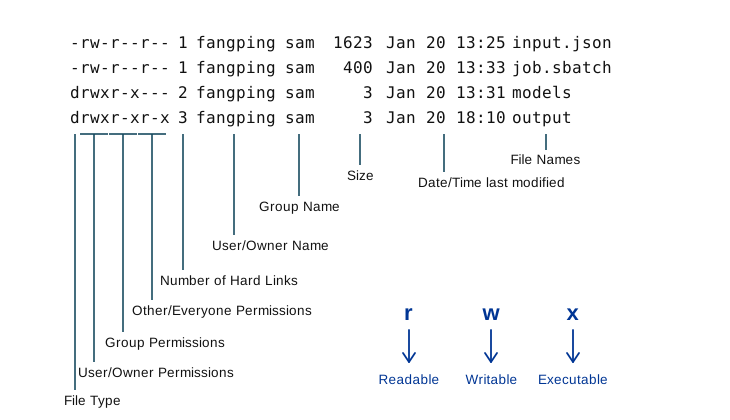
The execute (x) permission means something different on directories than on
files: on a directory it grants access through it — you need it to cd into
the directory, to ls -l its contents, or to reach anything beneath it. For
example, changing a shared output folder to 744 (drwxr--r--) would stop group
members and others from cd-ing into it.
Change permissions with chmod. Only the file's owner (or root) may change its
permissions. Changing the owning user requires root; you can change the
group with chgrp to any group you belong to.
Default permissions: umask
The permissions given to newly created files and directories are determined by
your umask, which subtracts from the maximum permissions. View it with:
umask
0022
Change it with, for example, umask 027 (which removes world access). Add the
line to your ~/.bashrc to make it permanent across sessions. Common values:
umask |
Effect |
|---|---|
002 |
Owner and group read/write files, read/write/execute directories; others read-only |
007 |
Owner and group read/write files and directories; others no access |
022 |
Everyone reads files and traverses directories; only owner writes (the default) |
027 |
Group reads; only owner writes; others no access |
077 |
Owner only |
Sharing data with others
By default, others cannot access your group's /ix/<group>, /ix1/<group>, or
/vast/<group> folders, nor /ihome/<group>. There are two cases:
Within your group. Give the group read and execute on each directory from your top level down to the files, then on the files themselves:
chmod g+rx <directory>     # for each directory in the path
chmod g+rx <file>          # read-only for the group
chmod g+rw <file>          # if the group should also edit it
Setting umask 002 or 007 makes new files group-accessible automatically.
With another group (collaborators). /ix and /ix1 locations are only
accessible to the allocation owner and the users they sponsor. To share with CRCD
users outside your group, request a shared folder by
submitting a ticket
with the collaborators' Pitt usernames and the access they need. The team creates
a folder such as /ix1/<group>/shared/<group>_<user> where both parties have the
appropriate access, implemented with Access Control Lists (ACLs) for
finer-grained control than plain Unix permissions allow.
Note
The exact ACL command depends on the filesystem's backend. Confirm the
current tool for /ix, /ix1, and /vast with the CRCD team before relying
on a specific setfacl/nfs4_setfacl invocation — the older /bgfs
filesystem has been decommissioned (see File Systems).
For the storage tiers, quotas, and snapshot/restore policy these permissions apply to, see File Systems.