Claude Code
Claude Code is an agentic coding tool that
runs in your terminal: it reads and edits files, runs commands, and works through tasks rather than
just answering questions. The claude-code module points it at a model you are hosting on a CRCD
GPU instead of at Anthropic's API, so your prompts and your code stay on the cluster.
The module does the whole setup for you. It loads a backend — vLLM or llama.cpp — starts the server, injects the flags that tool calling needs, and points Claude Code at the result.
Load claude-code first, not the backend
claude-code can only inject the tool-calling flags before the backend server starts. If you
load vllm or llamacpp yourself and then load claude-code, you get a warning and a server
that cannot call tools — which makes Claude Code unable to function as an agent at all.
Load claude-code and let it load the backend for you.
Before you start
You need an interactive allocation with a GPU. Claude Code is a terminal interface, so this is an interactive workflow — a batch job has nothing to attach to.
srun -M gpu -p rtx6k -n1 -c16 --gres=gpu:1 -t 2:00:00 --pty bash
Bear the cost in mind: the GPU bills for the full walltime whether you are typing or thinking. A coding session that runs all afternoon on a large card is expensive, so ask for the time you expect to use and stop when you are done. See Service Units.
The backend's own prerequisites still apply. For vLLM that includes creating the Hugging Face cache directory once, if you have never used it:
mkdir -p ~/.cache/huggingface
Quick start
export CLAUDECODE_BACKEND="vllm"
export CLAUDECODE_VLLM_TOOL_PARSER="hermes"
module load claude-code
The backend starts first, then claude-code reports what it has been pointed at:
vLLM (container) starting on gpu-n76:45349 (model: facebook/opt-125m)
Base URL: http://gpu-n76:45349  |  run 'vllm-status' to check readiness, 'vllm-stop' to end it early.
claude-code -> vllm at http://gpu-n76:45349 (model: facebook/opt-125m)
Run 'claude' to start a session, or 'claude-code-info' to see this config again.
Wait for vllm-status to report UP — the module returns your prompt before the model has
finished loading — then start a session:
claude
On a first run Claude Code asks you to pick a text style for your terminal. Choose one; /theme
changes it later. No login prompt appears, because the module sets CLAUDE_CODE_SKIP_AUTH_LOGIN=1.
Start claude from your project directory
Claude Code asks you to confirm the folder it is working in, and in that folder it can read,
edit and execute files. Launched from your home directory it is asking for all of it. cd to
the project you want it to work on first.
The header line reads API Usage Billing — that is Claude Code's label for key-based
authentication, not a sign that Anthropic is charging you. Requests are going to your own
GPU job.
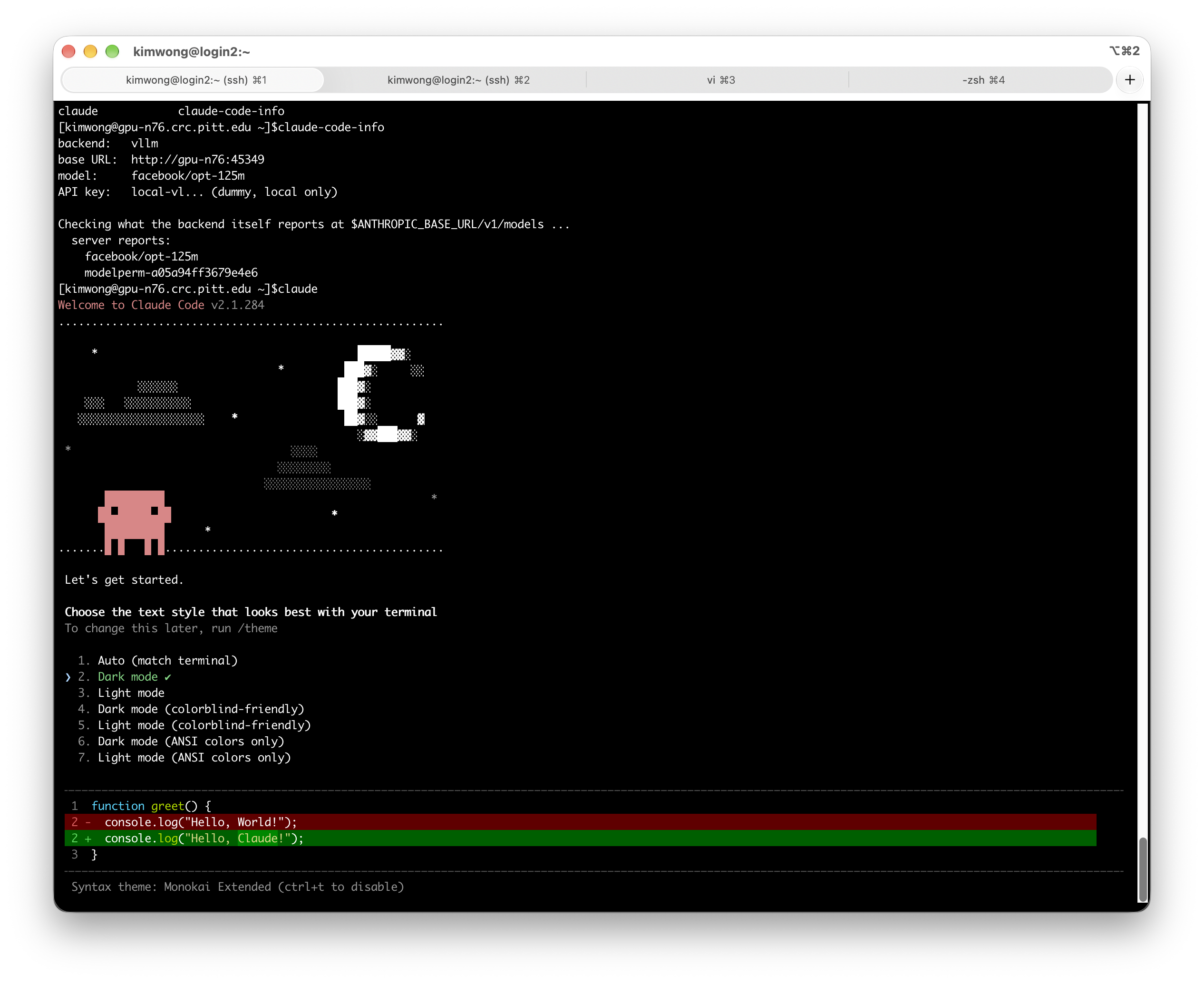
The default vLLM model, facebook/opt-125m, is only a placeholder: it has no chat template, so
expect claude's first message to fail, as chat interfaces do with it. It shows the module and
backend start correctly; for anything more, set the backend's model variable as well — see below.
CLAUDECODE_VLLM_TOOL_PARSER is required with the vLLM backend
vLLM needs a tool-call parser matched to your model's family, and there is no safe default to guess: the wrong one produces garbled tool calls rather than a clean error. The module refuses to load without it.
The llama.cpp backend needs no equivalent — its --jinja flag works for any model and is
injected automatically.
Choosing a model
Claude Code leans heavily on tool use — reading files, editing them, running commands — so pick a model with strong tool-calling support. A model that chats well but calls tools poorly will feel broken rather than merely weak, and tool-calling reliability is trained separately from code quality: a coder-tuned model is not automatically the better agent. See the failure below for what that looks like in practice.
# vLLM backend
export CLAUDECODE_BACKEND="vllm"
export VLLM_MODEL="unsloth/Llama-3.1-8B-Instruct"
export CLAUDECODE_VLLM_TOOL_PARSER="llama3_json"
export VLLM_DOWNLOAD_DIR=/vast/<group>/$USER/vllm

module load claude-code
# llama.cpp backend
export CLAUDECODE_BACKEND="llamacpp"
export LLAMACPP_MODEL="bartowski/Llama-3.3-70B-Instruct-GGUF:Q4_K_M"
export LLAMACPP_DOWNLOAD_DIR=/vast/<group>/$USER/llamacpp

module load claude-code
Every variable from the backend's own page still applies, because claude-code loads that module
rather than replacing it. Use Step 1 of Inference Servers to check your model
fits the card you requested — an 8B model in 16-bit needs about 16 GB, while a 70B model needs
about 140 GB in 16-bit but only about 42 GB as a Q4_K_M GGUF, which fits one RTX PRO 6000.
Tool-call parsers by model family
| Model family | CLAUDECODE_VLLM_TOOL_PARSER |
|---|---|
| Hermes-series (Nous Hermes 2 Pro / 3) | hermes |
| Llama 3.1 / 3.3 (including NVIDIA Nemotron models built on them) | llama3_json |
| Llama 4 | llama4_pythonic |
| IBM Granite | granite |
| OpenAI gpt-oss | openai |
| anything else | check the vLLM tool-calling documentation |
Some families — llama3_json, granite — also work better with a matching
--chat-template from vLLM's examples/ directory. Add it through VLLM_EXTRA_ARGS if tool calls
work but seem unreliable after setting the parser correctly.
Did not work: the tool call printed instead of running
With a coder-tuned model whose family had no working vLLM tool-call parser, and
CLAUDECODE_VLLM_TOOL_PARSER="hermes" set, the model
answered the question and then printed its tool call as plain text instead of invoking it:
Let's execute this command using the Bash tool:

{"name": "Bash", "arguments": {"command": "for i in {2..10..2}; do echo $i; done", ...}}

✻ Cooked for 7s · done
The command never ran — and note how this fails: the answer looks plausible, something
resembling a tool call appears, and the session reports done. It is easy to mistake for
success.
The setup is not broken. Pasting that same JSON back in as a prompt makes the tool run normally:
❯ {"name": "Bash", "arguments": {"command": "for i in {2..10..2}; do echo $i; done", ...}}

2
4
6
8
10
So vLLM's parser and Claude Code's tool loop both work. The problem is the model: it put the call in its message text rather than in the structured field the parser reads, and it does so inconsistently — the same session produced both outcomes.
What to do about it:
- Use a different model. This is the fix. Pick a model whose family has a matching parser
in the table above —
unsloth/Llama-3.1-8B-Instructwithllama3_json, for example. A coder-tuned model is not automatically a good agent: tool-calling reliability is trained separately from code quality. - Add a matching
--chat-templatethroughVLLM_EXTRA_ARGS, from vLLM'sexamples/directory. If the template does not wrap tool calls the way the parser expects, this is where the mismatch lives. -
Switch to the llama.cpp backend, whose
--jinjaflag handles tool calling without a parser selection at all:export CLAUDECODE_BACKEND="llamacpp" export LLAMACPP_MODEL="bartowski/Llama-3.3-70B-Instruct-GGUF:Q4_K_M" module load claude-code
Whichever you try, test with something trivial first — ask it to list a directory — and check the command actually ran. Because the failure is intermittent, one success does not prove the pairing is reliable.
Configuration
Set these before module load claude-code.
| Variable | Purpose | Default |
|---|---|---|
CLAUDECODE_BACKEND |
vllm or llamacpp |
vllm |
CLAUDECODE_VLLM_TOOL_PARSER |
Required with the vLLM backend. Parser matching your model family | none — the load fails without it |
CLAUDECODE_MODEL |
Model name sent to the backend in requests | the backend's VLLM_MODEL / LLAMACPP_MODEL |
CLAUDECODE_API_KEY |
Local placeholder key | local-vllm or local-llamacpp |
CLAUDECODE_BIN_DIR |
Alternate directory holding the claude binary |
this version's install directory |
Claude Code's own environment variables still work, and are read when you run claude rather than
at module load. CLAUDE_CODE_MAX_OUTPUT_TOKENS is the useful one — local models often have a
smaller output budget than Anthropic's hosted models:
export CLAUDE_CODE_MAX_OUTPUT_TOKENS=8192
claude
Checking what's running
claude-code-info
backend:   vllm
base URL:  http://gpu-n76:45349
model:     facebook/opt-125m
API key:   local-vl... (dummy, local only)

Checking what the backend itself reports at $ANTHROPIC_BASE_URL/v1/models ...
  server reports:
    facebook/opt-125m
    modelperm-a05a94ff3679e4e6
It prints the backend, base URL, and model Claude Code is configured to use, then queries the
backend's own /v1/models and shows what the server actually reports, so you can spot a mismatch. A mismatch is the usual cause of a confusing
"model not found" error — particularly with llama.cpp, where the served name does not always match
$LLAMACPP_MODEL exactly.
The backend's own helpers are loaded too:
vllm-status        # or llamacpp-status
vllm-stop          # or llamacpp-stop
What talks to the internet
The point of this setup is that inference happens on your GPU. The module sets
CLAUDE_CODE_DISABLE_NONESSENTIAL_TRAFFIC=1 to suppress telemetry and update checks, and
ANTHROPIC_BASE_URL points at your own job, so request traffic goes to the cluster rather than to
Anthropic.
Two things still reach outward, both from the backend rather than from Claude Code: downloading
model weights from Hugging Face on first use, and nothing else once the model is cached locally.
If you need a fully offline run, stage the model first and use VLLM_OFFLINE or
LLAMACPP_OFFLINE — see the backend pages.
Your backend is still reachable from the rest of the cluster
CLAUDECODE_API_KEY is a local placeholder, not a secret. Ports are open within the CRCD
environment, so anyone who finds your backend's host and port can send requests that bill
against your allocation. Keep the session short and stop the server when you finish. See
Keeping your endpoint private.
Stopping
Exit your claude session, then stop the backend:
vllm-stop # or llamacpp-stop
Ending the Slurm session stops the server too.
Troubleshooting
| Symptom | Cause | What to do |
|---|---|---|
CLAUDECODE_BACKEND must be 'vllm' or 'llamacpp' |
Typo, or a stale value from an earlier session | unset CLAUDECODE_BACKEND to fall back to the default |
The vllm/llamacpp backend did not report a base URL |
The backend failed to start | Scroll up for its own error — usually the Slurm-allocation or GPU check it runs itself |
API Error: 400 "auto" tool choice requires --enable-auto-tool-choice and --tool-call-parser to be set |
The parser was not set before vLLM started | Set CLAUDECODE_VLLM_TOOL_PARSER, then module unload vllm claude-code and reload |
vllm is already loaded in this session |
The backend was loaded before claude-code |
module unload <backend> claude-code, then load claude-code alone, or start a fresh shell |
| Claude Code reports a model not found | The served name differs from CLAUDECODE_MODEL |
Run claude-code-info, set CLAUDECODE_MODEL to the exact string it reports, and reload |
| Tool calls silently do nothing on the llama.cpp backend | --jinja missing, because llamacpp was loaded first |
Start from a fresh shell and load claude-code before the backend |
| Every message reprocesses the whole conversation, getting slower each turn | Prefix-cache defeat from a per-request header | The module sets CLAUDE_CODE_ATTRIBUTION_HEADER=0 to prevent this; check nothing in your .bashrc or ~/.claude/settings.json overrides it |
| Claude Code opens a browser or asks for an Anthropic login | A stale config from a non-module install | The module sets CLAUDE_CODE_SKIP_AUTH_LOGIN=1; remove any old ~/.claude.json or ~/.claude/settings.json |
If you are stuck, submit a help ticket
with the output of claude-code-info and the backend's log file.
Related
-
The serving workflow
Hardware sizing, finding your server, and the other ways to reach it.
-
The vLLM backend
Every
VLLM_*variable, including offline models and extra arguments. -
The llama.cpp backend
Quantized GGUF models, context size, and concurrency.
-
What a session costs
An interactive GPU session bills for its full walltime.