Using the llamacpp module
This module starts a private llama.cpp inference server for your job and gives you a URL to send requests to. It's for your own job only — it's not a shared/always-on service.
For choosing a GPU, reaching your server from elsewhere on the cluster, and connecting clients, see Inference Servers on the GPU Cluster.
Quick start
You need an interactive or batch SLURM job with a GPU attached. This will not work on a login node.
srun -M gpu -p rtx6k -n1 -c16 --gres=gpu:1 -t02:00:00 --pty bash

module load llamacpp/0.5.0
That's it — you'll see something like:
llama.cpp (container) starting - run 'llamacpp-status' to check readiness.
Base URL: http://gpu-n80:27555
The module loads its own container runtime, so you don't need to load Apptainer or Singularity yourself.
Keep an eye on the walltime you ask for. A GPU job bills for its full walltime whether or not it's answering requests, so request what you actually need and stop the server when you're done.
A small default model loads if you don't ask for anything else. To
pick your own model, set LLAMACPP_MODEL before loading the
module:
export LLAMACPP_MODEL="ggml-org/gemma-3-4b-it-qat-GGUF:Q4_0"
module load llamacpp/0.5.0
Any Hugging Face GGUF repo works — use the repo:tag form shown on
the model's Hugging Face page (the :tag picks a quantization).
Switching models
Set LLAMACPP_MODEL to something else and load the module again.
The running server is stopped before the new one starts:
[kimwong@gpu-n80.crc.pitt.edu ~]$ module load llamacpp/0.5.0
Stopped llama.cpp server (PID 3886172).

llama.cpp (container) starting - run 'llamacpp-status' to check readiness.
Base URL: http://gpu-n80:27744
The port changes each time, so re-read $LLAMACPP_BASE_URL and
update any client pointing at the old one.
Avoid preemptible partitions
A preempted job takes your endpoint down mid-request. Run servers on regular partitions. See Preemptible Partitions.
Checking readiness
Downloading and loading a model can take a while the first time. Poll with:
llamacpp-status
READY - http://gpu-n80:27555— you're good to goSTARTING - ...— still downloading/loading, try again shortlyDOWN - ...— it crashed; the message tells you where the log is
What you get after loading
The module sets these in your shell:
$LLAMACPP_BASE_URL— full URL to your server, e.g.http://gpu-n80:27555$LLAMACPP_LOGFILE— path to the server's log
There is no $LLAMACPP_PID, and the host and port aren't exported
separately. A batch script that needs the port can split it out of the
base URL:
HOSTPORT="${LLAMACPP_BASE_URL#http://}"
NODE="${HOSTPORT%%:*}"
PORT="${HOSTPORT##*:}"
Because there's no PID to watch, llamacpp-status is the only way for
a script to tell whether the server is still alive. A batch job that
needs to stay up for the server's lifetime can block on it:
while llamacpp-status | head -n1 | grep -qE '^(READY|STARTING)'; do
    sleep 60
done
Sending requests
The module sets $LLAMACPP_BASE_URL for you:
curl "$LLAMACPP_BASE_URL/v1/chat/completions" \
  -H "Content-Type: application/json" \
  -d '{"messages": [{"role": "user", "content": "Hello!"}]}'
It's an OpenAI-compatible API, so most OpenAI client libraries work
by pointing base_url at $LLAMACPP_BASE_URL and using any
placeholder API key (no key is required by default). model is
optional in the request body, since the server has only one loaded.
This server is unauthenticated and accepts any origin
llama.cpp logs this at startup:
W srv llama_server: security: no API key is set and CORS allows all origins
Ports are open within the CRCD environment, so anyone who finds
your host and port can send requests that bill against your
allocation, and any web page can call the endpoint from a browser.
Keep these jobs short, cancel them when you finish, and use
vllm with --api-key for anything long-lived or
sensitive.
Chat in your browser
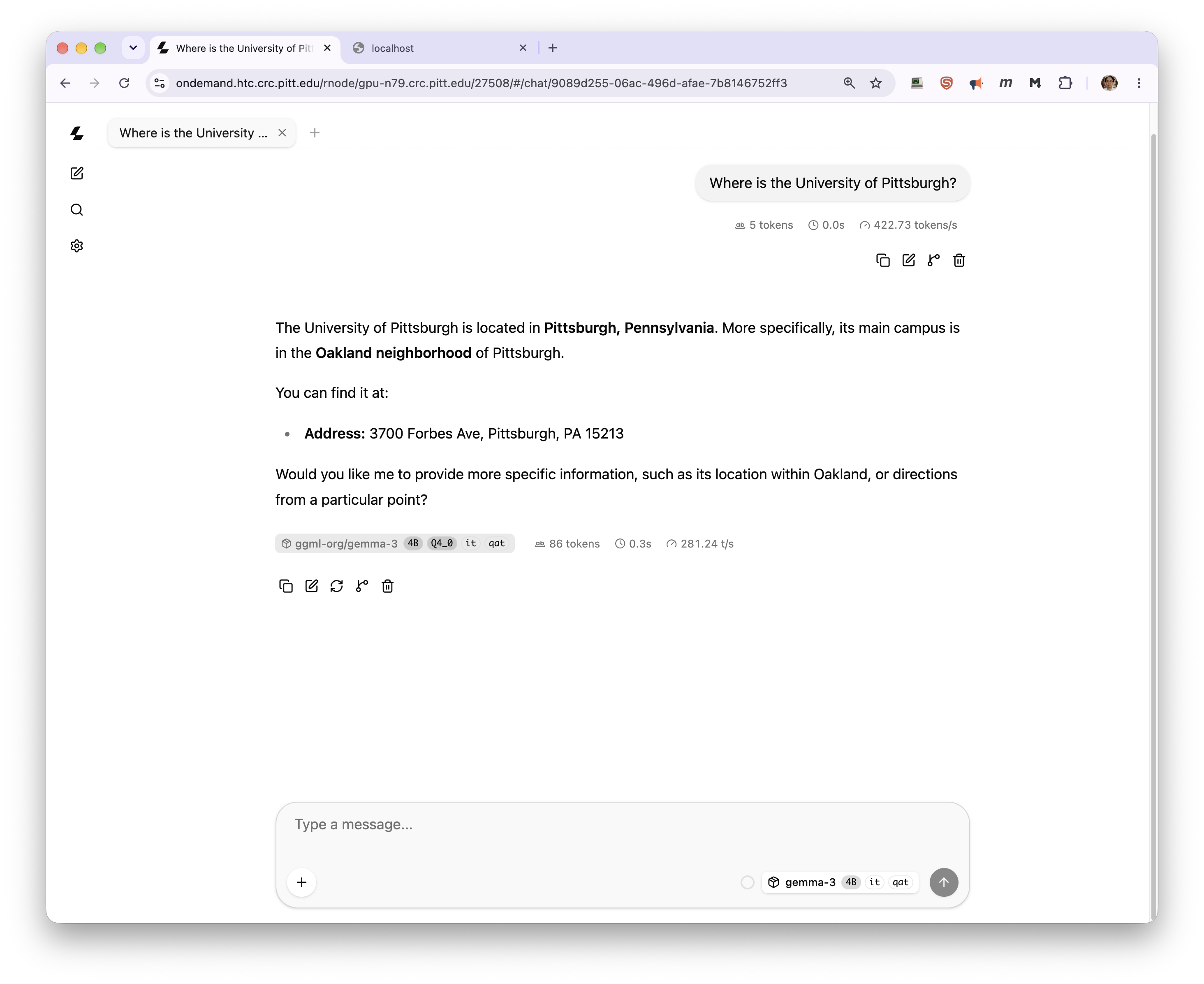
llama.cpp ships a web chat interface, served at the root of your server's URL. You can reach it through OnDemand's node proxy without a tunnel or any local software — build the URL from your base URL, keeping the trailing slash:
https://ondemand.htc.crc.pitt.edu/rnode/gpu-n79.crc.pitt.edu/27508/
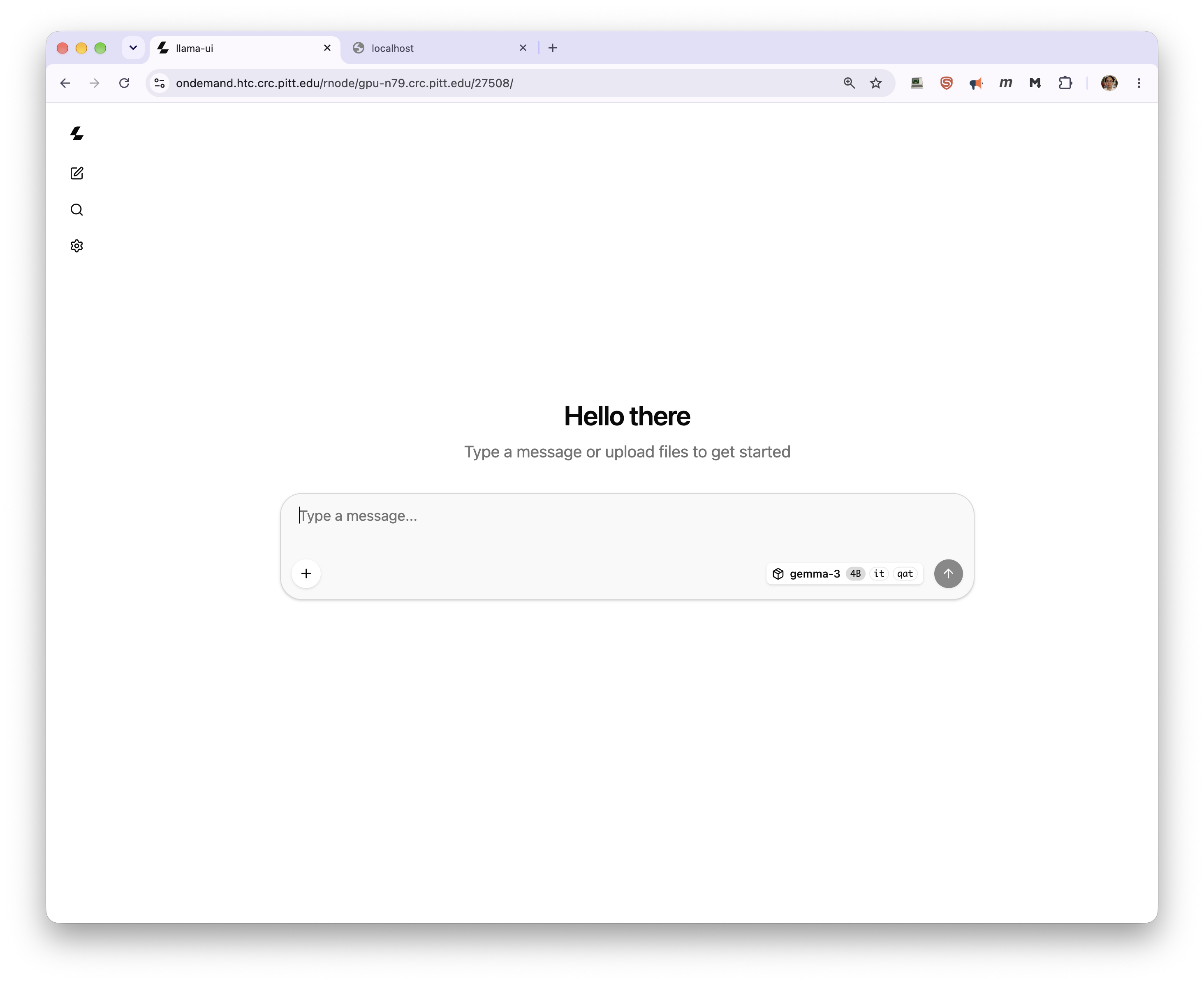
You must be logged in to OnDemand in the same browser. The model selector shows what the server has loaded, and each message is annotated with token counts and throughput.
Keep the trailing slash
Without it the browser resolves the interface's asset paths one
level too high and you get a blank page. A bare curl on the root
is also a poor test — the server answers GET / with
415 text/plain, which looks like a failure but isn't.
An SSH tunnel works too, if you'd rather not go through OnDemand:
ssh -N -L 8080:gpu-n79:27508 <pittID>@h2p.crc.pitt.edu
Then open http://localhost:8080/ on your own machine. Run that
command on your laptop, not on a login node. See
Inference Servers for the other access routes.
The chat interface is unauthenticated
It inherits the server's lack of authentication. Anyone logged in to OnDemand who knows your node and port can open the same interface and spend your allocation. Keep these jobs short and cancel them when you finish.
Using a gated or private model
Some Hugging Face repos require authentication:
export LLAMACPP_HF_TOKEN="hf_xxx"
export LLAMACPP_MODEL="meta-llama/some-gated-repo-GGUF:Q4_0"
module load llamacpp/0.5.0
Keep the token private and treat it like a password.
Using your own local GGUF file
If you already have a .gguf file (e.g. on air-gapped clusters with
no outbound network access):
export LLAMACPP_OFFLINE=1
export LLAMACPP_MODEL="/vast/$USER/models/my-model.gguf"
module load llamacpp/0.5.0
Where models are downloaded
By default models land under $HOME, which has a 75 GB quota. Point
LLAMACPP_DOWNLOAD_DIR at your group's space before loading the
module:
export LLAMACPP_DOWNLOAD_DIR=/vast/<group>/$USER/llamacpp
export LLAMACPP_MODEL="ggml-org/gemma-3-4b-it-qat-GGUF:Q4_0"
module load llamacpp/0.5.0
Files arrive in Hugging Face cache layout, and a repo may hold more than one file — this one brings a 2.5 GB GGUF plus an 851 MB multimodal projector, 3.2 GB in total:
/vast/<group>/$USER/llamacpp/
└── models--ggml-org--gemma-3-4b-it-qat-GGUF/
    ├── blobs/
    ├── refs/
    └── snapshots/bbcac0d.../
        ├── gemma-3-4b-it-qat-Q4_0.gguf -> ../../blobs/ee91c3e...
        └── mmproj-model-f16-4B.gguf    -> ../../blobs/c5271ca...
The .gguf entries under snapshots/<hash>/ are symlinks into
blobs/. If you later want to serve one as a local file with
LLAMACPP_OFFLINE=1, use the path inside snapshots/<hash>/ — not
the blob, whose filename is a checksum.
Common tweaks
export LLAMACPP_EXTRA_ARGS="-c 16384 -np 4"   # bigger context, 4 concurrent request slots
module load llamacpp/0.5.0
-c/--ctx-size controls the context window (-c 0 uses the model's
full native context); -np/--parallel controls how many requests it
can serve at once. Anything accepted by llama-server --help can go
in LLAMACPP_EXTRA_ARGS.
Shutting down
llamacpp-stop # stop the server, keep the module loaded
module unload llamacpp and module purge also stop it, and report
the PID they killed:
[kimwong@gpu-n80.crc.pitt.edu ~]$ module purge
Stopped llama.cpp server (PID 3879397).
Ending your SLURM session stops the server too, so you won't leave anything running behind.
If you run llamacpp-stop and then unload, the unload reports
No pidfile ...; nothing to stop — that is informational, not an
error; the server was already stopped. Unloading the module also
removes the container-runtime modules it brought in with it.
Troubleshooting
- "must be loaded inside a SLURM job" — you're on a login node. Start an interactive session or submit a batch job first.
- "No GPU is visible to this job" — your allocation doesn't have a
GPU attached. Re-request your session with a GPU, e.g. add
--gres=gpu:1to yoursalloc/srun/sbatchcommand, then load the module again. - Nothing happening for a while — check
llamacpp-status; a large model's first download can take several minutes. - Port already in use — shouldn't happen; the launch script
probes for a free port and retries automatically. If you still hit
this, check
$LLAMACPP_LOGFILEfor details. "llama-server": executable file not found in $PATH— this is an install issue, not something you can fix from a job. It means the site's.sifdoesn't havellama-serverset up as its entrypoint the way the official image does. Flag it to whoever maintains the module.error while loading shared libraries: libllama-server-impl.so: cannot open shared object file— also a site install issue, not something fixable from a job. The site's.sifwas built from an upstream llama.cpp image that's missing a library it needs (a known upstream packaging bug). Flag it to whoever maintains the module; they'll need to rebuild the.siffrom a different image tag.